Simple Children
Concept
Each successor of class Block can have children
blocks. Each class with items (currently
Matrix and
Layer) can have children for each item.
Every child is a gmsh_scripts file in JSON or YAML format.
Children are specified in data.children field. One could set transforms for
children at data.children_transforms field.
Items children are specified in data.items_children One should
set data.items_children_transforms and data.items_children_transforms_map
to apply transformations to them.
Children
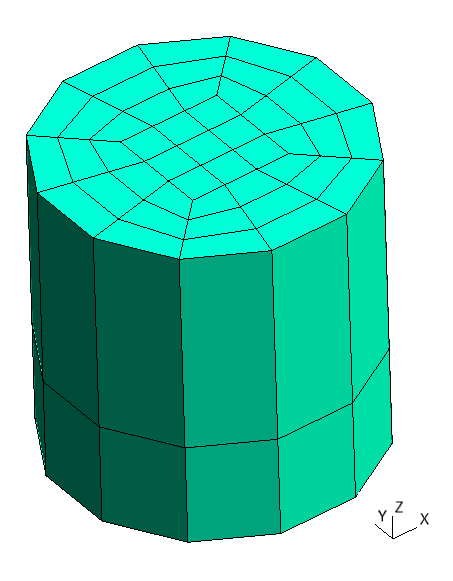
Let’s create two children and one parent. Children are instances of class
Layer, i.e. they are cylinders with different
radius. Parent is an instance of class
Block and has 3 items arranged along X-axis.
We create them structured and quadrated for convenience.
Child 1
 1metadata:
 2  run:
 3    factory: geo
 4    strategy:
 5      class: strategy.NoBoolean
 6data:
 7  class: block.Layer
 8  layer: [ [ 0.05;;4, 0.15;;4 ],
 9           [ 0.1;;2, 0.3;;2 ] ]
10  layer_curves: [ [ line, circle_arc ],
11                  [ line, line ] ]
12  items_zone: [ CHILD_1 ]
13  items_do_structure_map: 1
14  items_do_quadrate_map: 1
python -m gmsh_scripts child_1.yaml
Child 1
Child 2
 1metadata:
 2  run:
 3    factory: geo
 4    strategy:
 5      class: strategy.NoBoolean
 6data:
 7  class: block.Layer
 8  layer: [ [ 0.1;;4, 0.3;;4 ],
 9           [ 0.1;;2, 0.3;;2 ] ]
10  layer_curves: [ [ line, circle_arc ],
11                  [ line, line ] ]
12  items_zone: [ CHILD_2 ]
13  items_do_structure_map: 1
14  items_do_quadrate_map: 1
python -m gmsh_scripts child_2.yaml

Child 2
Parent
 1metadata:
 2  run:
 3    factory: geo
 4    strategy:
 5      class: strategy.NoBoolean
 6data:
 7  class: block.Matrix
 8  matrix: [ [ 0;;2, 1;;2, 2;;2, 3;;2 ],
 9            [ 0;;2, 1;;2 ],
10            [ 0;;2, 1;;2 ] ]
11  items_zone: [ PARENT ]
12  items_do_structure_map: 1
13  items_do_quadrate_map: 1
python -m gmsh_scripts parent.yaml

Parent
One can add children to parent specifying data.children with list of file
names of children started with / character.
 1metadata:
 2  run:
 3    factory: geo
 4    strategy:
 5      class: strategy.NoBoolean
 6data:
 7  class: block.Matrix
 8  matrix: [ [ 0;;2, 1;;2, 2;;2, 3;;2 ],
 9            [ 0;;2, 1;;2 ],
10            [ 0;;2, 1;;2 ] ]
11  items_zone: [ PARENT ]
12  children: [
13    /child_1.yaml,
14    /child_2.yaml
15  ]
16  items_do_structure_map: 1
17  items_do_quadrate_map: 1

Parent with children without children_transforms
As one can see, children are placed in their origin (0, 0, 0). To move them
to another location use data.children_transforms field that contains transforms
for each children according with their position in data.children field.
In this example, we move first child by -1 and second child by 2 along Y-axis.
 1metadata:
 2  run:
 3    factory: geo
 4    strategy:
 5      class: strategy.NoBoolean
 6data:
 7  class: block.Matrix
 8  matrix: [ [ 0;;2, 1;;2, 2;;2, 3;;2 ],
 9            [ 0;;2, 1;;2 ],
10            [ 0;;2, 1;;2 ] ]
11  items_zone: [ PARENT ]
12  children: [
13    /child_1.yaml,
14    /child_2.yaml
15  ]
16  children_transforms: [
17    [ [ 0, -1, 0] ],
18    [ [ 0, 2, 0] ]
19  ]
20  items_do_structure_map: 1
21  items_do_quadrate_map: 1

Parent with children with children_transforms
Items Children
Adding items children is a little trickier: first we need specify children for each item, then apply transformations to each child of each item.
Working with items consists of 2 steps: creating main field with options and
then creating addressing field, that ends with _map suffix with exception of
fields with do_ prefix, they don’t need main field. Each value in
addressing field is an index in main field and position of value indicates
to which item of Matrix or
Layer should be assigned option from
main_field.
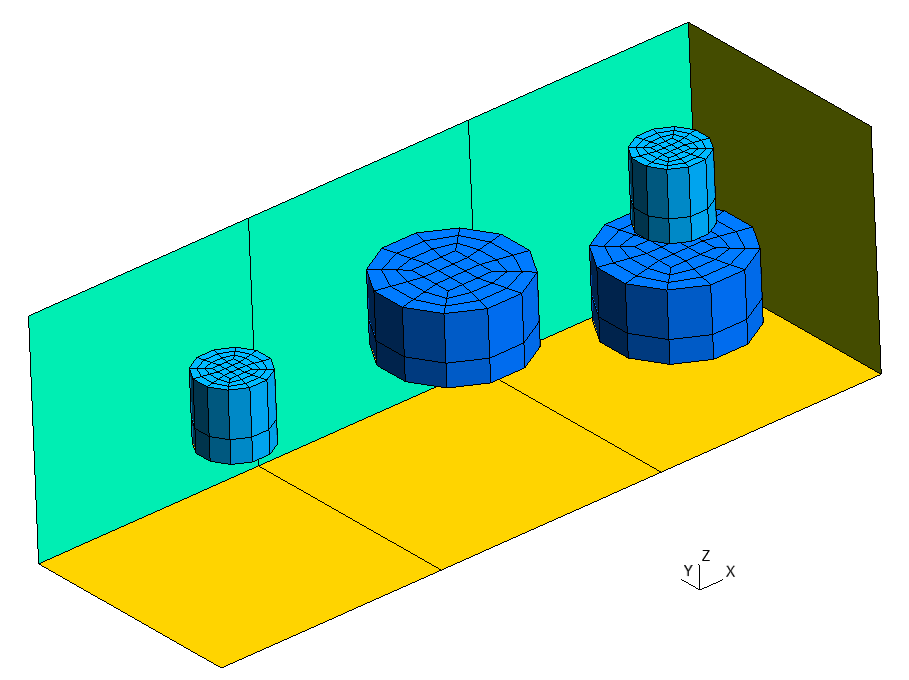
In this example, parent has 3 items, so addressing fields will have length of 3.
First we need to define main field for children items_children then
addressing field items_children_map.
items_children consists of 3 options, first and second assign one child to an item
and third - two:
/child_1.yaml,/child_2.yaml,/child_1.yamland/child_2.yaml.
items_children_map assigns first option from items_children to first item,
second option from items_children to second item, and third to third: [0, 1, 2].
Similarly fields items_children_transforms and items_children_transforms_map
are set.
items_children_transforms consists of 2 options, first assign no
transforms to one child and third one transform to two children:
[ [ ] ],[ [ [ 0, 0, 0.1 ] ], [ [ 0, 0, -0.3 ] ] ].
items_children_transforms_map assigns first option from items_children to first
and second items and second option to third: [0, 0, 1].
It’s convenient to create only geometry instead of mesh while working with children and their transformations.
 1metadata:
 2  run:
 3    factory: geo
 4data:
 5  class: block.Matrix
 6  matrix: [ [ 0;;2, 1;;2, 2;;2, 3;;2 ],
 7            [ 0;;2, 1;;2 ],
 8            [ 0;;2, 1;;2 ] ]
 9  items_zone: [ PARENT ]
10  items_children: [
11    [ /child_1.yaml ],
12    [ /child_2.yaml ],
13    [ /child_1.yaml, /child_2.yaml ],
14  ]
15  items_children_map: [
16    0, 1, 2
17  ]
18  items_children_transforms: [
19    [ [ ] ],
20    [ [ [ 0, 0, 0.1 ] ], [ [ 0, 0, -0.3 ] ] ],
21  ]
22  items_children_transforms_map: [
23    0, 0, 1
24  ]
25  items_do_structure_map: 1
26  items_do_quadrate_map: 1
python -m gmsh_scripts parent_items.yaml

Parent with items_children in geo_unrolled output format
After that we could add strategy to create the mesh.
 1metadata:
 2  run:
 3    factory: geo
 4    strategy:
 5      class: strategy.NoBoolean
 6data:
 7  class: block.Matrix
 8  matrix: [ [ 0;;2, 1;;2, 2;;2, 3;;2 ],
 9            [ 0;;2, 1;;2 ],
10            [ 0;;2, 1;;2 ] ]
11  items_zone: [ PARENT ]
12  items_children: [
13    [ /child_1.yaml ],
14    [ /child_2.yaml ],
15    [ /child_1.yaml, /child_2.yaml ],
16  ]
17  items_children_map: [
18    0, 1, 2
19  ]
20  items_children_transforms: [
21    [ [ ] ],
22    [ [ [ 0, 0, 0.1 ] ], [ [ 0, 0, -0.3 ] ] ],
23  ]
24  items_children_transforms_map: [
25    0, 0, 1
26  ]
27  items_do_structure_map: 1
28  items_do_quadrate_map: 1
Parent with items_children
We could supress generation of items (not their children) by setting
items_do_register_map to 0.
 1metadata:
 2  run:
 3    factory: geo
 4    strategy:
 5      class: strategy.NoBoolean
 6data:
 7  class: block.Matrix
 8  matrix: [ [ 0;;2, 1;;2, 2;;2, 3;;2 ],
 9            [ 0;;2, 1;;2 ],
10            [ 0;;2, 1;;2 ] ]
11  items_zone: [ PARENT ]
12  items_children: [
13    [ /child_1.yaml ],
14    [ /child_2.yaml ],
15    [ /child_1.yaml, /child_2.yaml ],
16  ]
17  items_children_map: [
18    0, 1, 2
19  ]
20  items_children_transforms: [
21    [ [ ] ],
22    [ [ [ 0, 0, 0.1 ] ], [ [ 0, 0, -0.3 ] ] ],
23  ]
24  items_children_transforms_map: [
25    0, 0, 1
26  ]
27  items_do_structure_map: 1
28  items_do_quadrate_map: 1
29  items_do_register_map: 0

Parent with items_children without items
We could also create many copies of children inside an item adding additional
parameter after coordinate with : separator, e.g. 5:4 divides last item into
3 parts (with 4 nodes) and creates children inside each part.
 1metadata:
 2  run:
 3    factory: geo
 4    strategy:
 5      class: strategy.NoBoolean
 6data:
 7  class: block.Matrix
 8  matrix: [ [ 0;;2, 1;;2, 2;;2, 5:4;;2 ],
 9            [ 0;;2, 1;;2 ],
10            [ 0;;2, 1;;2 ] ]
11  items_zone: [ PARENT ]
12  items_children: [
13    [ /child_1.yaml ],
14    [ /child_2.yaml ],
15    [ /child_1.yaml, /child_2.yaml ],
16  ]
17  items_children_map: [
18    0, 1, 2
19  ]
20  items_children_transforms: [
21    [ [ ] ],
22    [ [ [ 0, 0, 0.1 ] ], [ [ 0, 0, -0.3 ] ] ],
23  ]
24  items_children_transforms_map: [
25    0, 0, 1
26  ]
27  items_do_structure_map: 1
28  items_do_quadrate_map: 1
29  items_do_register_map: 0

Parent with items_children with extended third item
All together
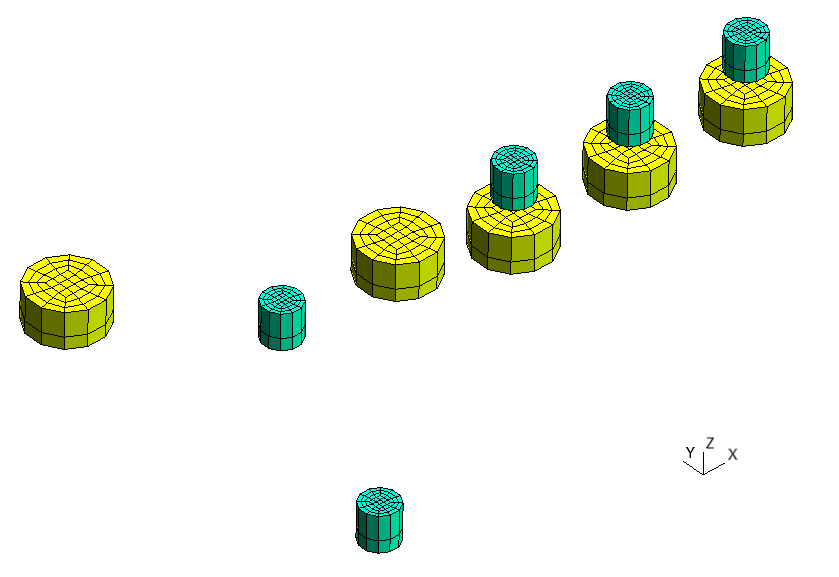
One could combine children and items_children, e.g. to add
arbitrarily and regularly located children.
 1metadata:
 2  run:
 3    factory: occ
 4    strategy:
 5      class: strategy.NoBoolean
 6data:
 7  class: block.Matrix
 8  matrix: [ [ 0;;2, 1;;2, 2;;2, 5:4;;2 ],
 9            [ 0;;2, 1;;2 ],
10            [ 0;;2, 1;;2 ] ]
11  items_zone: [ PARENT ]
12  children: [
13    /child_1.yaml,
14    /child_2.yaml
15  ]
16  children_transforms: [
17    [ [ 0, -1, 0 ] ],
18    [ [ 0, 2, 0 ] ]
19  ]
20  items_children: [
21    [ /child_1.yaml ],
22    [ /child_2.yaml ],
23    [ /child_1.yaml, /child_2.yaml ],
24  ]
25  items_children_map: [
26    0, 1, 2
27  ]
28  items_children_transforms: [
29    [ [ ] ],
30    [ [ [ 0, 0, 0.1 ] ], [ [ 0, 0, -0.3 ] ] ],
31  ]
32  items_children_transforms_map: [
33    0, 0, 1
34  ]
35  items_do_structure_map: 1
36  items_do_quadrate_map: 1
37  items_do_register_map: 0
python -m gmsh_scripts parent_all.yaml
Parent with children and items_children
Mesh
To create mesh we need boolean operations that are available in occ factory.
Warning
It’s recommended to disable items_do_structure_map and items_do_quadrate_map
fields, i.e. to create unstructured tetrahedral mesh while using boolean operations
to achieve better stability of mesh generation.
1data:
2  class: block.Layer
3  layer: [ [ 0.05;;4, 0.15;;4 ],
4           [ 0.1;;2, 0.3;;2 ] ]
5  layer_curves: [ [ line, circle_arc ],
6                  [ line, line ] ]
7  items_zone: [ CHILD_1 ]
8  items_do_structure_map: 0
9  items_do_quadrate_map: 0
1data:
2  class: block.Layer
3  layer: [ [ 0.1;;4, 0.3;;4 ],
4           [ 0.1;;2, 0.3;;2 ] ]
5  layer_curves: [ [ line, circle_arc ],
6                  [ line, line ] ]
7  items_zone: [ CHILD_2 ]
8  items_do_structure_map: 0
9  items_do_quadrate_map: 0
 1metadata:
 2  run:
 3    factory: occ
 4data:
 5  class: block.Matrix
 6  matrix: [ [ 0;;2, 1;;2, 2;;2, 5:4;;2 ],
 7            [ 0;;2, 1;;2 ],
 8            [ 0;;2, 1;;2 ] ]
 9  items_zone: [ PARENT ]
10  children: [
11    /child_1.yaml,
12    /child_2.yaml
13  ]
14  children_transforms: [
15    [ [ 0, -1, 0 ] ],
16    [ [ 0, 2, 0 ] ]
17  ]
18  items_children: [
19    [ /child_1.yaml ],
20    [ /child_2.yaml ],
21    [ /child_1.yaml, /child_2.yaml ],
22  ]
23  items_children_map: [
24    0, 1, 2
25  ]
26  items_children_transforms: [
27    [ [ ] ],
28    [ [ [ 0, 0, 0.1 ] ], [ [ 0, 0, -0.3 ] ] ],
29  ]
30  items_children_transforms_map: [
31    0, 0, 1
32  ]
33  items_do_structure_map: 0
34  items_do_quadrate_map: 0
35  items_do_register_map: 1
python -m gmsh_scripts parent_all.yaml

Mesh generated with occ factory
One could customize mesh quality using run.options fields, e.g:
Mesh.MeshSizeFactor- factor applied to all mesh element sizes,Mesh.MeshSizeMin- minimum mesh element size,Mesh.MeshSizeMax- maximum mesh element size,Mesh.MeshSizeExtendFromBoundary- extend computation of mesh element sizes from the boundaries into the interior (0: never;1: for surfaces and volumes;2: for surfaces and volumes, but use smallest surface element edge length instead of longest length in 3D Delaunay;-2: only for surfaces;-3: only for volumes),Mesh.MeshSizeFromCurvature- automatically compute mesh element sizes from curvature, using the value as the target number of elements per 2 * Pi radians.
Note
See documentation of gmsh for more information about options and their description.
 1metadata:
 2  run:
 3    factory: occ
 4    options:
 5      Mesh.MeshSizeFactor: 1.0
 6      Mesh.MeshSizeMin: 0.1
 7      Mesh.MeshSizeMax: 0.3
 8      Mesh.MeshSizeExtendFromBoundary: 2
 9      Mesh.MeshSizeFromCurvature: 12
10data:
11  class: block.Matrix
12  matrix: [ [ 0;;2, 1;;2, 2;;2, 5:4;;2 ],
13            [ 0;;2, 1;;2 ],
14            [ 0;;2, 1;;2 ] ]
15  items_zone: [ PARENT ]
16  children: [
17    /child_1.yaml,
18    /child_2.yaml
19  ]
20  children_transforms: [
21    [ [ 0, -1, 0 ] ],
22    [ [ 0, 2, 0 ] ]
23  ]
24  items_children: [
25    [ /child_1.yaml ],
26    [ /child_2.yaml ],
27    [ /child_1.yaml, /child_2.yaml ],
28  ]
29  items_children_map: [
30    0, 1, 2
31  ]
32  items_children_transforms: [
33    [ [ ] ],
34    [ [ [ 0, 0, 0.1 ] ], [ [ 0, 0, -0.3 ] ] ],
35  ]
36  items_children_transforms_map: [
37    0, 0, 1
38  ]
39  items_do_structure_map: 0
40  items_do_quadrate_map: 0
41  items_do_register_map: 1

Mesh configured with metadata.run.options